AICopy
Clean Markdown, citation debris, and decorative Unicode icons from AI answers so copied text feels less machine-formatted and ready to send.
Less AI flavor. Ready to send.
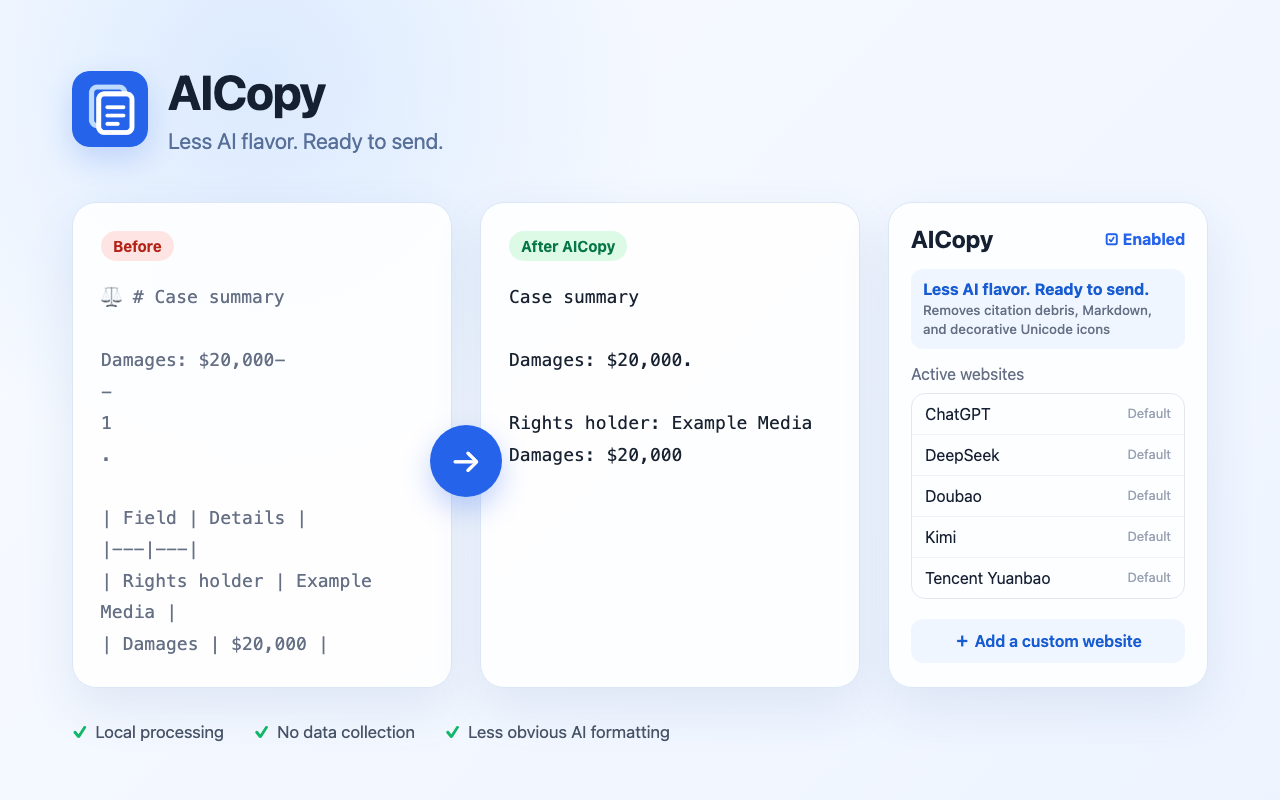
When someone asks you a question, you can draft the answer with ChatGPT, DeepSeek, Doubao, or another AI tool, then copy it into the conversation. The native copy often brings along #, **, citation numbers, broken dashes, table pipes, and decorative Unicode icons such as ⚖️, 📝, and 💎—obvious signs of machine-formatted text.
AICopy cleans those artifacts locally at copy time, repairs punctuation and paragraphs, then writes the result back to the clipboard. You keep using the website’s existing copy button—there is no extra step. It cleans presentation without rewriting the answer’s facts, opinions, or tone.
Key features
- Works with native AI-site copy buttons and
Cmd/Ctrl+C - Handles headings, emphasis, links, quotes, lists, and code fences
- Removes citation chips and wrapped debris such as stray
-,1, and18 - Rejoins punctuation displaced by citation markers
- Removes decorative Unicode icons such as ⚖️, 📝, and 💎
- Converts two-column tables into mobile-friendly “label: content” text
- Supports Clipboard API, ClipboardItem, and
execCommand('copy') - Can be disabled and can explicitly authorize additional websites
- Processes everything locally without uploading clipboard or conversation data
Supported by default
ChatGPT, Gemini, Claude, DeepSeek, Grok, Perplexity, Microsoft Copilot, Poe, Mistral, Doubao, Qwen, ERNIE Bot, ChatGLM, Kimi, Tencent Yuanbao, and iFlytek Spark, plus Manus.
How to use
- Install AICopy from the Chrome Web Store.
- Open a supported AI website.
- Use the native response copy button, or select text and press
Cmd/Ctrl+C. - When the green “AI formatting cleaned and copied” notice appears, paste and send.
The extension UI automatically follows Chrome’s English or Simplified Chinese interface language.
How it works
AICopy covers several copy implementations:
- Standard
copyevents. - Response-copy recognition and final-answer extraction for sites such as ChatGPT, DeepSeek, and Manus.
navigator.clipboard.writeText/write.- Hidden text areas and legacy
document.execCommand('copy'). - Copy libraries that write directly to
clipboardData. - A shared cleanup pipeline for citations, Unicode ornaments, punctuation, and tables.
This layered design reduces breakage when AI websites change their DOM or copy libraries.
Privacy and permissions
AICopy has no account, server, analytics, or advertising. It stores only its enabled state and the list of websites explicitly added by the user.
Read the full AICopy Privacy Policy.
Release status
AICopy is available now in the Chrome Web Store. The project is actively maintained as AI websites change their copy controls and page structure.